What you see from anywhere
The owner of a guard company is never at a desk when it matters. Command is the back office in your pocket: the live map, the review queue, dispatch, SOS response — and every site alert, whether or not that site has a supervisor.
Free 30-day trial with no card required. $7/guard per month, everything included.
The morning-coffee numbers
Guards on duty right now, reports awaiting review, open incidents, missed shifts and tours this week, open dispatch calls, visitors on site. Tap any of them to act. The SOS bell and chat live in the top bar. Same account as the web, same data, same role scoping — supervisors see their sites, owners see everything.
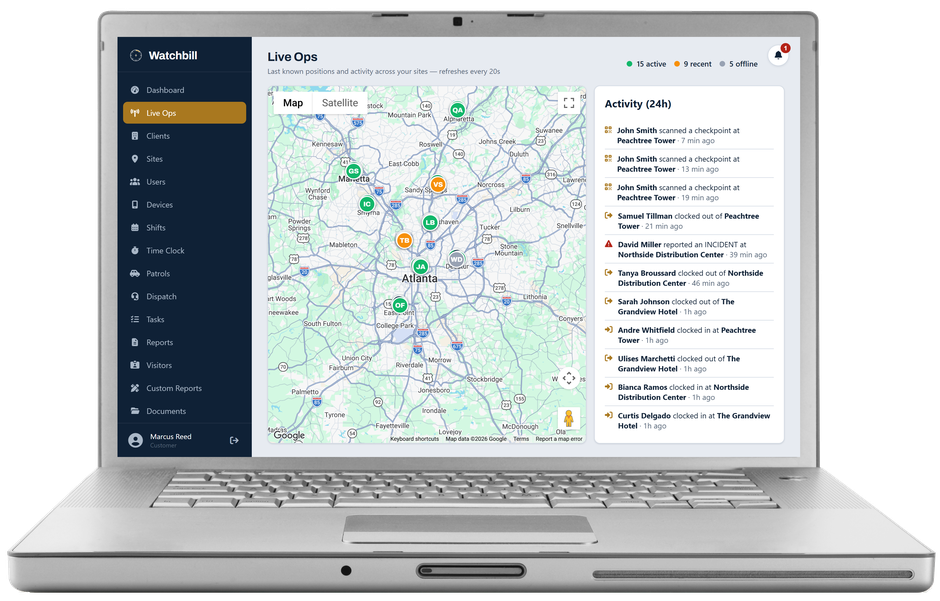
The live map
Every guard's last verified position — green clocked in, amber recent, grey offline — site pins, SOS alerts flashing red, and the activity feed of clock events, scans, patrol stops, submissions, check-ins, parking actions and expired watch-mode timers, refreshing on its own. Positions come from work events only; nobody is tracked off shift.
Alerts that find you, not the other way round
Missed shift. Arrived late. Left early. Clocked in at the wrong site. Left the site boundary. Phone stopped reporting. No response to a welfare check. Tour missed. Patrol ended under target. SOS. Each arrives as a push notification the moment Watchbill knows, to the supervisors assigned to the site and to you — owners are on every site alert by default, so a site with no supervisor still reaches someone. The inbox keeps them all with tap-through to the right screen.
Clear the review queue from the parking lot
Reports open to the full detail — narrative, people, attachments, addendums — and approve or reject with one tap. Rejecting sends it back to the guard with your notes. Approving is what makes it visible to the client portal, so a queue you clear on the way home is a client who sees last night's work by morning.
Dispatch and SOS, handled from the phone
Create and assign calls, watch them move Assigned → En route → On scene → Resolved, add notes to the timeline. A call whose job type requires a report cannot be closed until the officer has written it from the call — or until you, as a manager, close it without one for a reason that goes on the record. When an SOS comes in, acknowledge it so the guard knows help is coming, then resolve with an outcome note; the history keeps every alert including false alarms.
Today's scheduled work, and the conversations
The day's tours, checklists and patrol occurrences with status — due, running, completed, missed — by site, plus the shift schedule with the same statuses as the web. Messaging is the same as everywhere else: threads with guards and office staff, and, as owner, a read-only view of all company conversations because messages are company records.
Questions owners ask
Do I need Command if I use the web app?
The web app does everything. Command is for the hours you're not at a desk — which, for most owners, is most of them — and it's where the push alerts land.
Can a supervisor use both apps?
Yes. Supervisors who also work posts sign into Field for their own shifts and Command for oversight, with the same account.
Can I turn off the owner alerts?
Yes — Settings → Alerts. Site supervisors always get them; owners are added by default and can be switched off once every site has a supervisor.
Get the alerts in your pocket by tonight
Free 30-day trial with no card required. Start with one site and add the rest when you're ready.
Start free trial Request a demo