How do you know your guard is actually there?
A guard clocks in, leaves, and comes back hours later to clock out — and the timesheet looks perfect. Another clocks in and sleeps. Watchbill catches both, and finds the guard who collapsed alone at 3 a.m. while it's at it.
Free 30-day trial with no card required. $7/guard per month, everything included.
Left the site
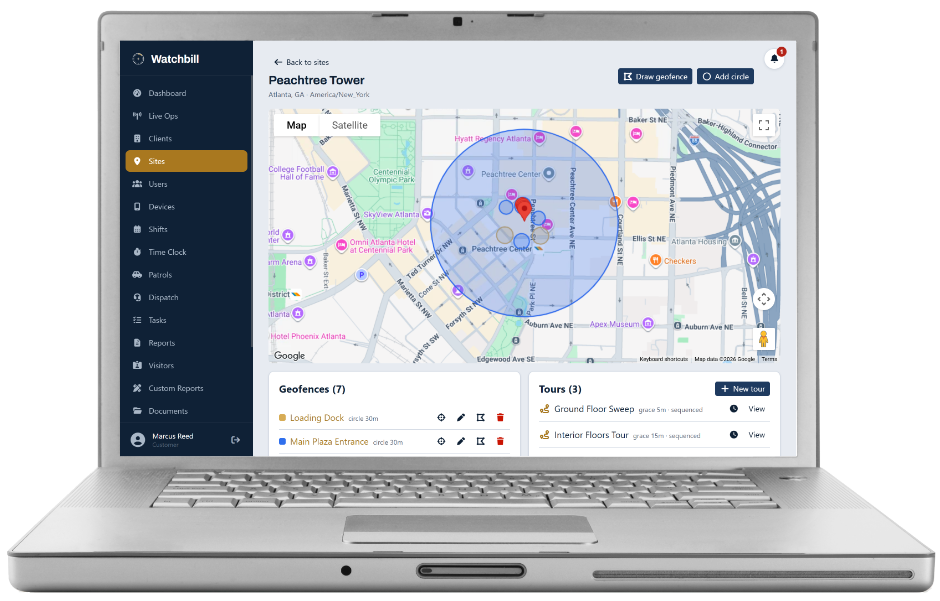
Draw one fence around the whole property — parking lot and sidewalk included, with cushion — and mark it as the site boundary. From then on, while a guard is clocked in at that site, Watchbill checks their position against it. Outside for longer than your grace period (10 minutes by default) and the site's supervisors and the owners get "Left the site". The time outside accumulates as off-site minutes and shows on the shift as off-site 2h 10m, beside late and left-early.
It won't cry wolf. GPS wanders indoors, so one stray fix outside the fence never alerts — only a sustained stretch does. Fixes the phone itself reports as inaccurate are ignored. And vehicle patrols are exempt: while a guard has a patrol run open, the boundary isn't evaluated at all, because driving the route is the job.
On the Shifts page the excursion shows beside late and left-early — off-site 1h 55m on an In Progress shift — while the guard is still on the clock.
Location stopped reporting
A guard who wants to hide doesn't walk out of the fence with the app running. He closes the app, or switches the phone off. So while clocked in, the Field App sends a small "still here" signal every few minutes even when the phone hasn't moved. Silence beyond your threshold (20 minutes by default) raises "Location stopped reporting" — phone off, app killed, or location disabled. A phone lying still on the desk does not trigger it, and the alert re-arms when the phone comes back.
Welfare check-ins for lone workers
Location can't detect sleep: a guard standing at a fixed post and a guard asleep at it look identical on a map. So for lone-worker sites you switch on welfare check-ins with an interval that suits the post — 30 minutes minimum, an hour is typical for a lobby desk with no tours.
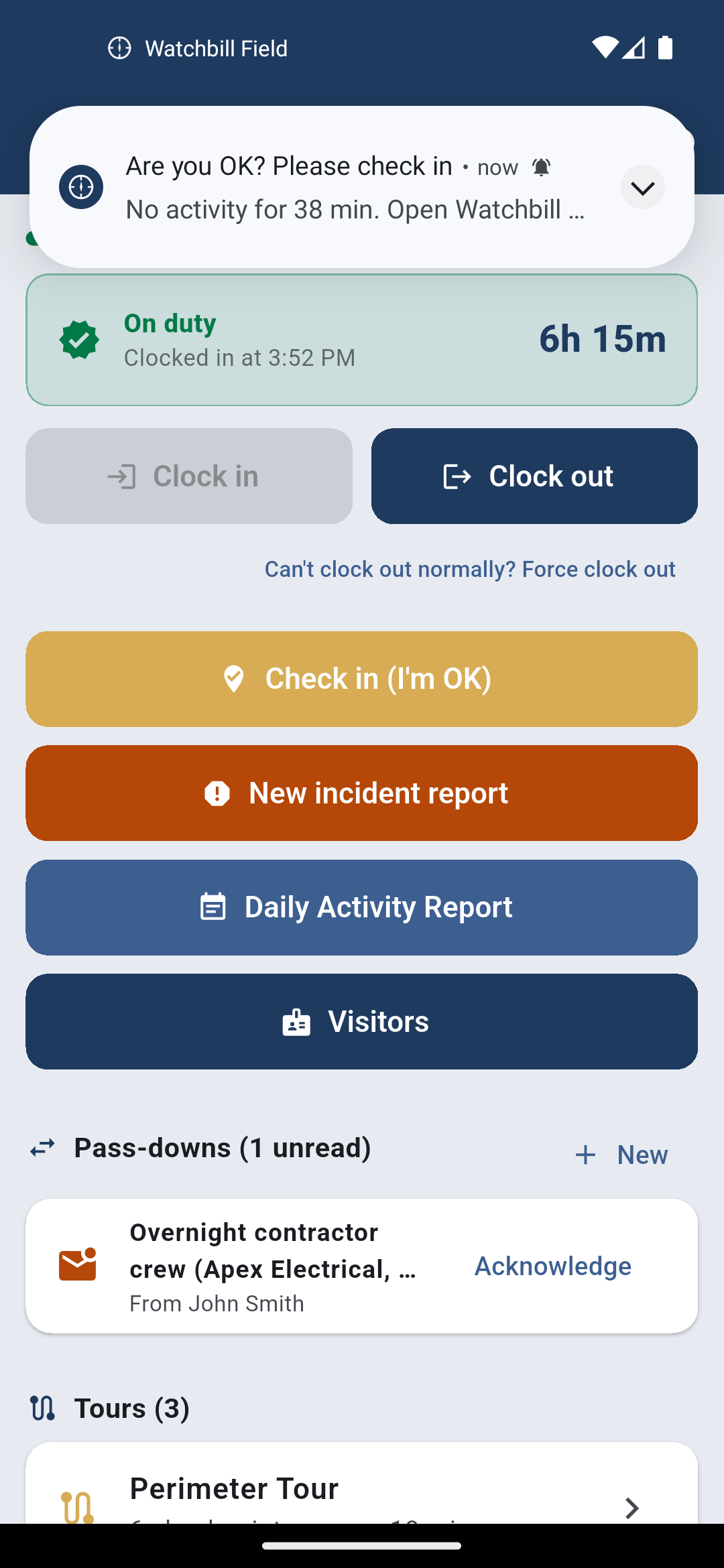
Watchbill tracks the guard's last deliberate action: a checkpoint scan, a report or DAR entry, a checklist item, a patrol stop, a tap on "Check in (I'm OK)". Location pings deliberately don't count — a phone in a sleeping guard's pocket keeps reporting. When the interval passes with nothing, the guard gets a push: Are you OK? Please check in. Five minutes without a response and the supervisors and owners get "No response to welfare check". Prompts keep coming every interval until the guard responds.
Frame it to your guards as what it is: a safety net for someone working alone at 3 a.m. That is how guards accept it. It also ends the sleeping-guard problem, and you don't have to lead with that.
- A post with an hourly tour barely needs it — every scan counts as activity
- The 30-minute floor is deliberate: a prompt every few minutes trains guards to ignore it
- Standalone lone-worker apps charge for this timer; here it's in the price
Watch mode: a countdown the guard sets before a risky task
Welfare check-ins are you watching the guard. Watch mode is the guard watching themselves. Before checking a tripped alarm in a dark building, walking a far lot, or escorting someone to a car at 2 a.m., the guard sets a countdown of 5 to 120 minutes and types what they're doing. Tap I'm OK before it ends and nobody hears a thing. Let it reach zero and the site's supervisors and owners get "Watch mode expired" with the guard's name, the note, how long it has been, and where the timer was started.
The guard is warned a minute out and can add five minutes as often as needed. If the timer does expire and the guard then clears it, the office gets the all-clear automatically, so a supervisor already dialling knows to stop. Every start, extension and clear lands in the compiled Daily Activity Report.
- Nothing to configure — it's on every site, every guard, from the first day
- One timer per guard; clocking out closes it quietly
- Starting a timer needs a signal: the office has to know it exists
The trail: proof for the client who asks
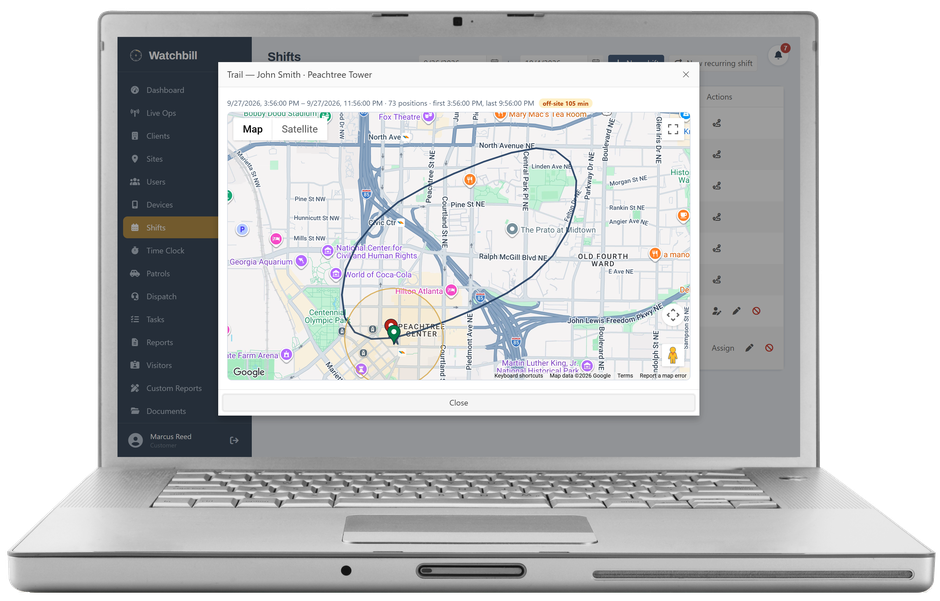
Any shift a guard clocked into has a Trail: a map of where they were during the shift, as a line with start and latest pins, the site boundary drawn for reference, and any off-site minutes. When a client says "your guard wasn't even there," this is what you send them. When the guard was there, this is what wins the argument.
Nothing alerts until you set it up
A site with no boundary drawn is never evaluated. Welfare check-ins are off until you turn them on per site. Thresholds are company settings with floors, so a tight setting can't turn a supervisor's phone into noise. Alerts arrive as push on the Command app and in the web notification bell, to the site's supervisors and — by default — every owner, so a site with no supervisor still alerts someone.
Questions owners ask
Will my guards accept being tracked?
Location is recorded only between clock-in and clock-out, the app tells them so, and the boundary check never fires on a single stray GPS fix. Guards who are doing the job have nothing to explain, and the trail protects them when a client is wrong.
Does it work with the phone in a pocket and the screen off?
Yes. The app keeps reporting in the background. Some Android phones aggressively kill background apps to save battery; the Field App tells guards how to exempt it, and the Devices page shows you whether a phone is reporting normally.
How fast does an alert arrive?
Presence is evaluated every few minutes, so "Left the site" lands within minutes of the grace period ending. Welfare escalation is five minutes after the prompt.
Is this a panic button?
No — SOS is separate and always available. Welfare check-ins are for the case where the guard can't press anything, and watch mode is for the case where the guard knows in advance that something might go wrong.
Draw one boundary and watch a real shift
Free 30-day trial with no card required. Start with one site and add the rest when you're ready.
Start free trial Request a demo