Prove the route was walked. Every shift, every site.
"The guard does rounds every hour" is a promise. A timeline of checkpoint scans with photos is proof. Watchbill gives you the proof — for foot tours, opening and closing checklists, and drive-by vehicle patrols — and tells you the same night when a round didn't happen.
Free 30-day trial with no card required. $7/guard per month, everything included.
Guard tours with checkpoints that can't be faked
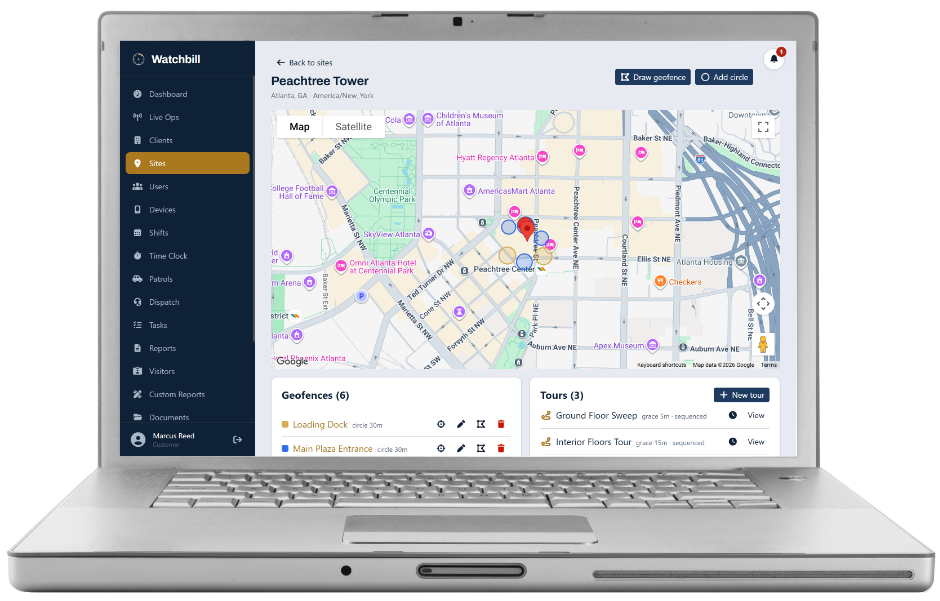
A tour is an ordered walk through checkpoints. Each one verifies in one of three ways: a GPS check-in inside a geofence you drew (the loading dock, the roof access, the far corner of the lot), an NFC tag scan, or a QR code scan. Print QR sticker sheets straight from the site page, with a placement guide showing which code goes where. Use scans wherever GPS is weak.
Mark a checkpoint photo required and the camera opens right after the scan — the server rejects the scan without it. That is the answer to "was the roll-up door actually closed?" and to the guard who hands his phone to a colleague.
- Grace minutes per tour — how late a scan can be before it's flagged
- Sequenced tours enforce the order; unsequenced ones don't
- A guard can leave mid-tour for a dispatch call and resume exactly where they stopped
Scheduled, and missed tours tell on themselves
Schedule tours by days and times and the instances appear in the guard's "due" list on their own. A scheduled tour nobody starts is marked Missed and supervisors are notified. One started but not finished is recorded as Partial — reality is recorded, never faked. Every run has a timeline: each checkpoint's scan time, method, GPS link, late flag and photo, zoomable.
Checklists for the things that aren't a walk
Opening and closing procedures, equipment checks, meter readings. Items can be required, require a photo, or require a value (a count, a reading). Run them ad-hoc or on a schedule like tours — scheduled ones are marked Missed if nobody claims them. Every tick is GPS-stamped as it happens and syncs offline, so nothing is lost if the app closes.
Vehicle patrols, with the visit count the client is paying for
For drive-by service: vehicles with pre- and post-trip inspections and odometer-based mileage, and routes as an ordered list of site stops. Each stop sets how many separate visits the driver should make that run — a dealership paying for three drive-bys a night is one stop with Visits = 3 — and how to prove each one: GPS stamp, geofence arrival, or a specific NFC/QR scan.
Every visit files its own patrol-visit report the client can see in their portal, with notes and photos. Ending a run below a stop's visit target is allowed but visible: the run is badged under target and the office is notified that night, naming the guard, vehicle, route and shortfall — not when the client calls.
- Arriving inside the site's geofence upgrades the proof level automatically
- A patrol survives leaving the screen or restarting the app — it resumes from the server
- Patrol schedules flag runs that never started
The shortest order, and directions to the next stop
Routes with eight or nine sites get drawn in whatever order someone typed them. Optimize order in the route designer works out the shortest driving sequence between the sites' map pins, shows you the before and after — 14.2 km now, 9.8 km proposed — and applies it only when you say so. Routes saved that way carry an "Optimized" tag that quietly disappears if anyone reorders by hand, so the tag always means what it says.
In the Field App, every stop has a Navigate button that opens it in Google Maps or Apple Maps for turn-by-turn, or send the whole remaining route as one trip. A driver who starts somewhere else taps From here and the stops still owed are reordered from their current location — on their screen only; the office's route and the visit counts don't change. Straight-line distances, not drive time, and always a proposal rather than a rule.
Questions owners ask
Does Watchbill plan the driving route?
It orders the stops for the least driving (straight-line between site pins, shown before it changes anything) and hands each stop, or the whole route, to Google Maps or Apple Maps for turn-by-turn. It does not compute road routes itself.
QR or NFC?
QR is cheaper and works on every phone; NFC is faster and can't be photographed and scanned from a desk. Many companies use QR indoors and NFC at exterior posts. Both prove presence the same way.
Can a guard scan a photo of the QR code?
Of a code that's permanently on a wall — yes, that's a known weakness of QR everywhere. Pair a photo-required checkpoint or NFC with the ones that matter.
Do clients see tours?
Clients see approved reports and patrol-visit reports for their sites. Tour run timelines are yours; export the evidence when you need to show it.
Print one QR sheet and run a real tour tonight
Free 30-day trial with no card required. Start with one site and add the rest when you're ready.
Start free trial Request a demo