A time clock that proves where the punch happened
Paper timesheets and buddy punching cost guard companies hours every week — and a client dispute over one shift can cost the contract. Watchbill's clock verifies the guard is at the site, keeps breaks honest, flags every session that needs a human, and on payday hands your payroll system a file it can import.
Free 30-day trial with no card required. $7/guard per month, everything included.
Clock in with proof, per site
Each site sets how a guard proves they're there: inside a geofence you draw on the map, a scan of a QR code you print and stick up, an NFC tag registered from the app, or a plain GPS stamp for low-stakes posts. Use scans where GPS is weak — stairwells, parking decks, interiors. There is deliberately no way to type a tag number by hand.
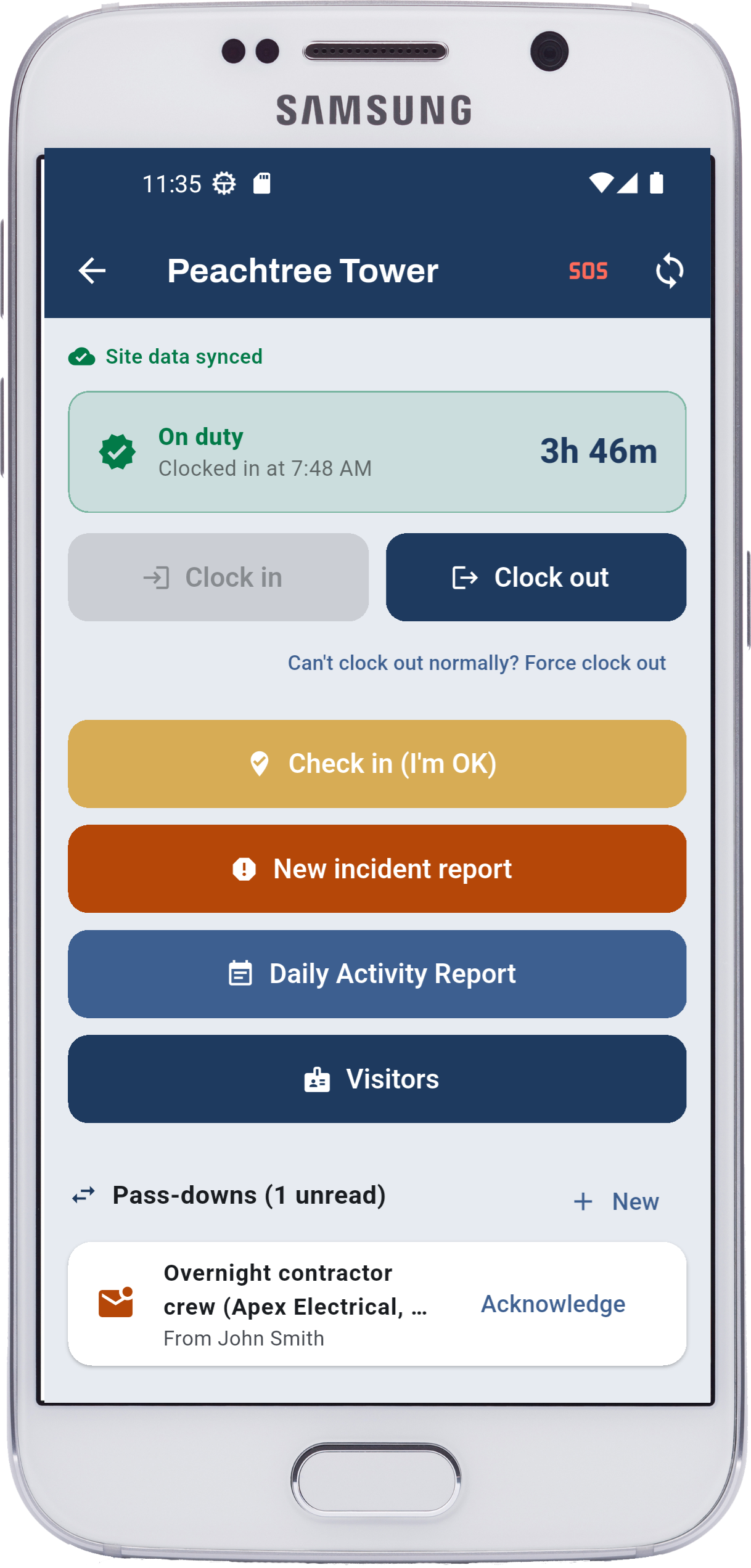
The clock-in itself takes one tap on the site screen. It queues offline and syncs when coverage returns, so a dead zone never means a missing punch.
Breaks that stay inside the session
Clocking out "on break" and back in keeps the break inside one session, so payroll sees a shift with a meal in it rather than two half-shifts. You define which break types are paid and which aren't.
Every session checks itself against the schedule
A clock-in by the assigned guard at the scheduled site links to that shift automatically and drives its status — In progress, Completed — and its late and left-early figures. A guard with no shift, or one who clocks in after the shift ended, still gets a session; it just isn't attributed to a shift. Time is never lost, only the attribution. And while the session is open, Watchbill watches presence and welfare too — see the presence page.
Review what needs a human, not everything
The review page lists every session with its verification method, GPS points, breaks and computed minutes — and flags the ones that need attention. A force clock-out (the guard couldn't clock out normally and had to give a reason) is flagged. A forgotten clock-out is auto-closed after 16 hours and flagged. You can edit with an audit trail, split a break in, or add a manual entry. Guards see their own history in the app and on a read-only "My Time" page.
- Verification method recorded per punch — geofence, QR, NFC or manual
- Edits keep the original; the change history is part of the record
- Location is recorded from clock-in to clock-out and not otherwise — guards are told so in the app
Payday: export the period, import it, done
Tell Watchbill your pay period once — weekly, every two weeks, twice a month or monthly — and Time Clock → Export timesheets opens on the period that just ended. Pick the template for your payroll system and read the preview before you download: guards, days, sessions, paid hours, and the things a clerk needs to know — sessions still flagged for review, sessions still open, guards missing a payroll ID.
Templates match the hours-import layouts of Gusto, ADP RUN, Paychex Flex and QuickBooks Online Payroll, plus a generic per-day timesheet and a per-employee summary. Each guard carries the ID your payroll system knows them by — ADP File #, Paychex Worker ID — so the file lands on the right people. Every export is logged: who, when, which period.
What it deliberately doesn't do: calculate pay. Paid breaks count as paid time and unpaid breaks don't, exactly as your break types say; optional rounding applies to the file, never to the record; and overtime is left to payroll unless your rule is simply "over 40 in a week", in which case one switch splits it out. Daily-overtime states keep that switch off, and the export says so.
- Generic per-day rows are per guard, per day, per site — the same file is your hours-by-client report for invoicing
- UTF-8 CSV that opens cleanly in Excel; every provider imports it
- Verify the first import in your payroll system — each one has a column-mapping screen, and that's what it's for
Questions owners ask
Can a guard clock in from home?
Not at a site that requires geofence, QR or NFC verification — the clock-in is refused outside the zone or without the scan. A plain-GPS site records where the punch happened, so it shows.
What happens if the phone dies mid-shift?
The session stays open. The guard can clock out from another device, or the office force-closes it with a note; after 16 hours it auto-closes and is flagged for review.
Does it track guards off the clock?
No. Location is recorded only between clock-in and clock-out, and the app says so on screen.
Which payroll systems does the export work with?
Ready-made templates for Gusto, ADP RUN, Paychex Flex and QuickBooks Online Payroll, plus a generic CSV that any payroll or accounting system can import. There is no live API sync — a file you can open before importing is more trustworthy on payday, and it never breaks at 6 a.m.
Does it calculate overtime?
Only if you ask it to, and only the simple rule: hours past 40 in a workweek. Anything state-specific — daily overtime, double time, seventh-day rules — belongs to your payroll system, so by default every hour exports as Regular.
Retire the paper timesheet this week
Free 30-day trial with no card required. Start with one site and add the rest when you're ready.
Start free trial Request a demo